Frequently asked questions
Everything you need to know to ask your first query, become a responder, and earn credits.
How to ask a query
Just Check needs a point on the map to match you with a responder who's physically nearby. Here's the full flow in pictures.
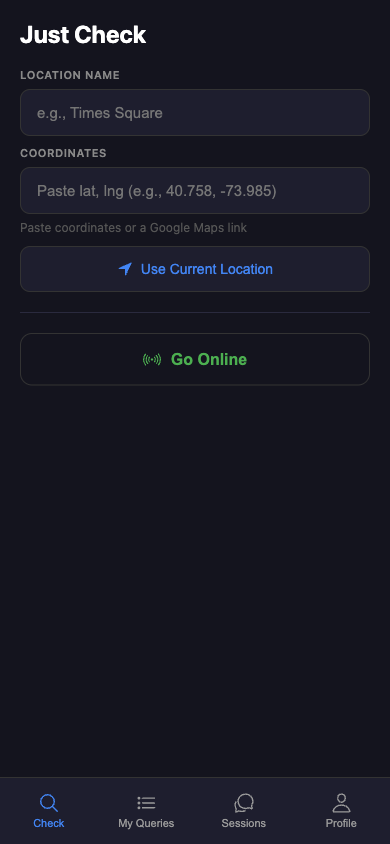
Open the Check tab
This is where every query starts. You can type a location, paste coordinates, or tap Use Current Location to grab the pin from your phone's GPS.
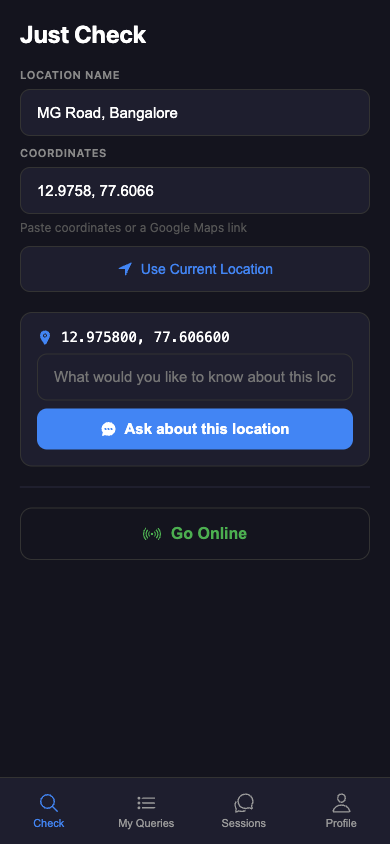
Tell us where to ask about
Type a short name and paste latitude, longitude (or a Google Maps share link). When the card appears with "Ask about this location", you're good to go.
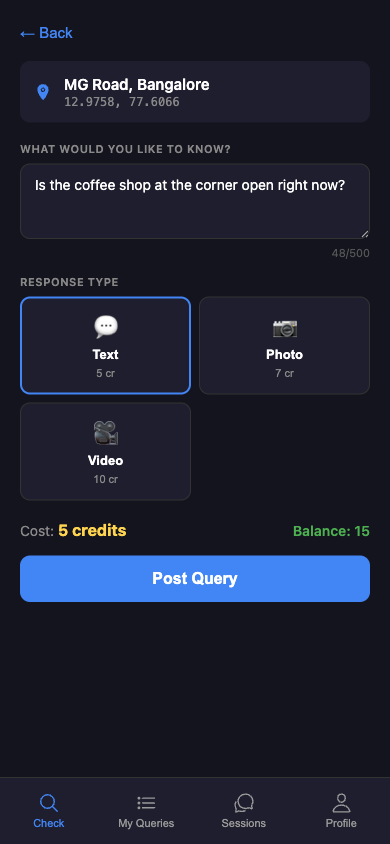
Write the question, pick a format
Text is 5 credits, photo 7, video 10. The cost and your balance are shown just above Post Query. Tap it and Just Check starts ringing nearby responders — 200 m first, widening to 10 km.
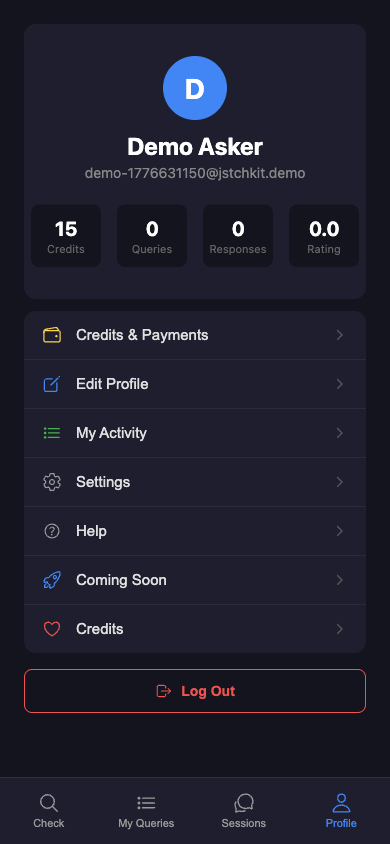
Track it from your profile
Once a responder picks up, a private 1-on-1 chat opens — end-to-end encrypted, peer-to-peer, no server in the middle. You can follow up or upgrade mid-session to photo or video.
How do I get the exact latitude/longitude of a place?
You don't have to type coordinates — search by name or long-press the map and the pin's lat/long is captured automatically. If you need to get coordinates from somewhere else (e.g. someone sent you a location over WhatsApp):
- Open Google Maps on your phone.
- Long-press the spot you want. A red pin drops.
- At the top of the screen you'll see numbers like
12.9716° N, 77.5946° E. Tap to copy. - In Just Check's query composer, paste into the search field and pick the result.
What makes a good query?
Specific beats general. Responders earn better ratings for useful answers, so they prefer questions with a clear "thing to check":
- ✅ "How busy is the trail at Sunset Point right now?"
- ✅ "Is the North entrance gate at Lalbagh open at this hour?"
- ✅ "Any parking free in front of 123 Main Street?"
- ❌ "How's the DMV?"
- ❌ "What's it like there?"
What if no-one responds?
Every query has a 5-minute window. If the search ring reaches 10 km without a match, the query auto-cancels and your credits are refunded in full.
Can I ask for a photo or video after starting with text?
Yes — any session can be upgraded mid-flight. Tap ⋯ → Request photo / video / call. Both parties must consent. If you upgrade, you're charged the difference in credit cost.
How to earn as a responder
You're out and about anyway. Someone nearby wants to know what's going on around you. Answer, get paid.
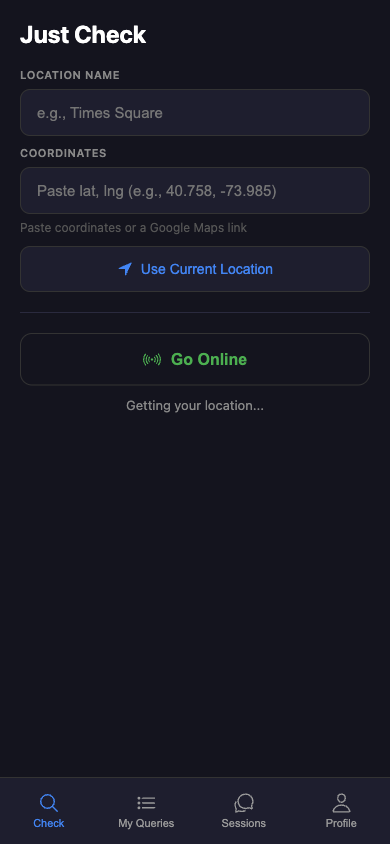
Tap the green "Go Online" button
It sits just below the location fields on the Check tab. As soon as you tap it your approximate position is streamed to the matcher — only while you're online, and nothing is kept after you go offline.
Wait for a ping
When someone nearby posts a query that matches your preferences — response types you accept, max radius you've set — you get a push notification with 30 seconds to tap Accept.
Give a specific answer
"About 30 people in line, moving fast" earns 5 stars. "Kinda busy" doesn't. Higher-rated responders get matched first next time, so crisp answers compound.
Watch the balance grow
Earned credits land in the Credits counter on your Profile the moment the session ends — no holding period. Spend them on your own queries; direct-to-bank cash-out is planned.
How much do I earn per session?
Just Check takes 1 credit per session to cover infrastructure. Your share is the cost minus 1.
| Session type | Querier pays | You earn |
|---|---|---|
| Text | 5 credits | 4 credits |
| Photo | 7 credits | 6 credits |
| Video | 10 credits | 9 credits |
| Voice call | 15 credits | 14 credits |
Earned credits build up in your balance and can be spent on your own queries. Cash-out to a bank account is planned but not live yet.
Which queries will I be matched with?
In Responder Preferences you choose:
- Accept types — text, photo, video, voice call. Any subset.
- Max radius — how far from you a query can be (e.g. 2 km).
You only get notified about queries that match both filters. Skip costs nothing; the query just looks for someone else.
How do I boost my chances of getting matched?
- Be online during busy hours. Rush hour, weekend evenings, event times.
- Hang out in query-rich locations. Popular markets, tourist spots, busy streets.
- Accept quickly. Queriers see a "Finding a responder" spinner. Fast accepts get higher ratings.
- Keep your rating above 4.0★. When multiple responders are eligible, higher rating matches first.
Credits
The short version: you get 15 free credits every day, and you earn more by answering queries. Today they're spent inside the app; direct-to-bank cash-out is on the roadmap.
Do free credits roll over if I don't use them?
No. Daily free credits max out at 15 and reset at midnight UTC. Earned credits (from answering queries) never expire.
Which credits are used first — free or earned?
Free credits are deducted first. Earned credits are only touched when your free balance hits zero. Refunds (cancelled queries, rejected upgrades) always go back to the paid pool, never the free one.
Can I withdraw my credits as money?
Not yet. Right now credits stay inside the app — you can use them on your own queries, or save them for later. Direct-to-bank cash-out is on the roadmap; we'll announce when it goes live.
Privacy & safety
Can anyone read my chats?
No. Chat, photos, and video calls are peer-to-peer (WebRTC) — the traffic never touches our servers. We can't read your messages even if we wanted to. We do see that a session happened (for ratings and billing), but not the contents.
What location data do you store?
While you're online as a responder we track your approximate location to match queries. The data is used in-memory only and purged minutes after you go offline. We don't keep a history of where you've been.
Read the full details in the Privacy Policy.
Can I block or report someone?
Yes. After any session you can rate 1★ and optionally report with a reason. Repeat reports trigger moderation review; serial offenders are banned.
General
Does the app work outside India?
Yes, the app works anywhere with GPS and data. Matching depends on the density of online responders near the target — the more people running Just Check nearby, the faster you'll get a match.
Is there an iOS version?
Coming soon. Right now we have an Android APK + a web version you can run on any browser including Safari on iPhone. Pure web works for queriers; responders need the mobile app for background location.
I found a bug or have a feature request.
Please write to the dev team — replies guaranteed within a day or two.